6 Software Components Behind a Persistent Online Game Account

Online game accounts depend on several connected software systems to remember a player’s identity, progress, items, and activity between sessions. Data collected by game platforms can include account identifiers, gameplay history, purchases, device information, and interactions with other players. The Supercell privacy policy, for example, states that its services collect account and game-progress data, including an internal account ID in most cases.
Listings for Clash Royale accounts for sale illustrate how much information can become associated with a persistent digital profile over time. Levels, unlocked content, resources, achievements, and account history may all remain connected to the same profile. However, Supercell states that buying, selling, sharing, or giving away its game accounts violates its Terms of Service. Its terms describe accounts as non-transferable and say users do not gain a property interest in them.
From a technical perspective, that persistent profile is not a single file sitting on a phone. It is better understood as several software components working together. Six of them are especially important.
1. Authentication Connects a Player to the Correct Account
Authentication answers a basic question: which user is trying to access this profile? A game may rely on an email address, verification code, password, device credential, or another authentication method to confirm identity.
NIST describes authentication as the process used to establish that someone attempting to access a system is the previously authenticated subscriber. Modern authentication systems can use different levels of protection depending on the risk involved.
Once authentication succeeds, session-management software keeps the user signed in while the game communicates with backend services. OWASP explains that session identifiers allow servers to associate later requests with an authenticated user. Protecting those identifiers is important because a stolen session could allow another party to impersonate the legitimate user.
2. Profile Databases Store the Account’s Persistent Identity
A profile database gives the account a long-term identity that survives app closures, device changes, and software updates. Instead of treating every login as a new player, the backend can retrieve records associated with an internal user ID.
These records can contain profile settings, player identifiers, game statistics, purchase records, and other account-level information. Supercell confirms that it automatically collects information about accounts, game progress, gameplay, purchases, devices, and player interactions as part of operating its services.
Separating this information from the physical device is what allows a digital game identity to remain persistent.
3. Progression Tracking Records What the Player Has Accomplished
Progression systems record changes made through play. Depending on the game, this can include experience, rankings, completed stages, character levels, trophies, achievements, or unlocked features.
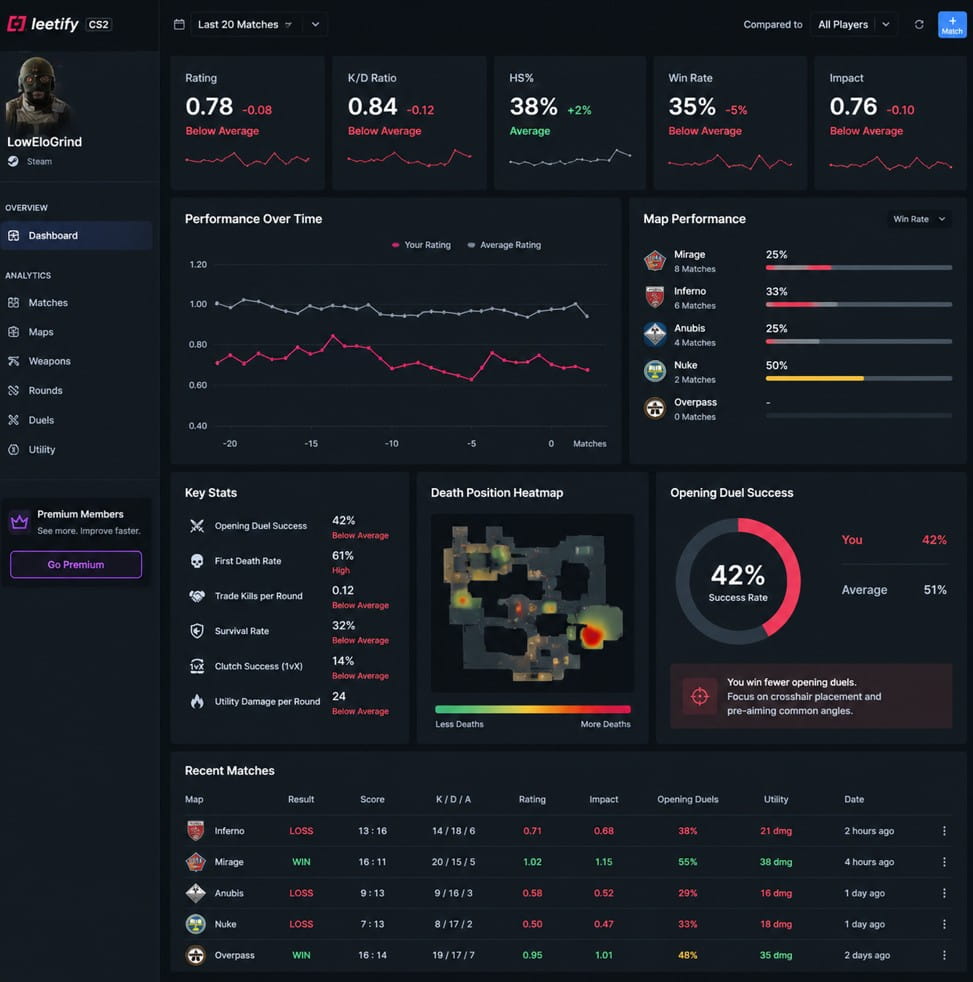
The important technical point is persistence. Progress cannot disappear every time the application closes. Apple explains in its GameKit documentation that game-save data can preserve a player’s progress after quitting and allow that progress to remain available when switching between supported devices. Beyond saved progress, gameplay analytics tools can also use match data to reveal longer-term performance patterns, such as consistency, survival rates, and recurring weaknesses.
Developers therefore need systems that regularly record valid changes and associate them with the correct account. This turns hours or years of activity into an ongoing digital history.
4. Inventory Systems Keep Track of Digital Resources
Many games also maintain an inventory connected to the player’s profile. Depending on the design, this may contain characters, cards, equipment, currencies, cosmetics, upgrades, or other virtual resources.
These records need clear identifiers and quantities so the server knows what a profile currently has. They also need transaction rules to prevent conflicting updates, such as spending the same resource twice.
Ownership inside a game’s software should not automatically be confused with legal ownership outside it. Supercell states that virtual items, currencies, content, and other account attributes remain subject to its service rules and generally cannot be transferred unless the service specifically permits it.
5. Cloud Synchronization Keeps Devices Consistent
Persistent accounts become more useful when progress can follow a player between devices. Cloud synchronization makes this possible by storing important game data remotely and retrieving the appropriate version when the player signs in elsewhere.
Apple documents this model through GameSave and GameKit. Its systems can synchronize saved game information through iCloud, support device switching, and handle common issues such as conflicting saves and offline play.
This also explains why reinstalling an app does not always erase a player’s history. The local application may be replaceable, while the persistent profile remains connected to server or cloud records.
6. Security Monitoring Watches for Suspicious Activity
The final component operates mostly in the background. Security systems monitor account access and look for events that could indicate misuse.
OWASP recommends logging authentication successes and failures, account lockouts, suspicious session activity, and other security events. Its session-management guidance also notes that changes in device or network characteristics can help systems identify unusual behavior.
Game publishers can add their own protections. Supercell offers Account Protection features that include SMS verification and recovery codes for Supercell ID accounts. The company also says it monitors areas such as account sharing and fraudulent activity as part of its fair-play controls.
Why Persistent Accounts Are More Than Login Credentials
A modern gaming account represents a network of connected data rather than a simple username. Authentication identifies the player. Databases maintain the profile. Progress systems record achievements. Inventory services track virtual resources. Cloud systems keep devices synchronized, while security tools monitor access.
Together, these components explain why long-running profiles can carry extensive digital histories. They also show why account access, platform rules, and security matter whenever another person attempts to control an established profile. As online games become increasingly connected across devices and services, reliable data management and identity protection will remain central to keeping persistent accounts usable and secure.


 Everything we use online, from social media platforms to shopping website, is built through coding and software development. These tools make our daily digital interactions possible. While the world of coding may sound technical or complicated, understanding the basics can help anyone appreciate how websites and apps work.